Login
If you already have a Crewlap Back Office account, sign in with your email address and password.
Before you log in, make sure your account is registered. If you have an invitation but no account yet, use Registration.
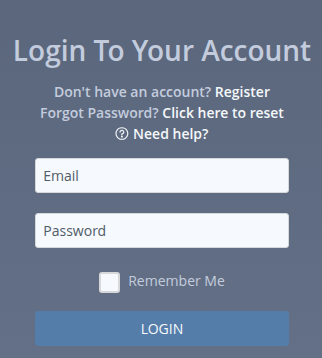
Log In
Enter your email address in the Email field.
Enter your password in the Password field.
Select Remember Me only if this is your own trusted device.
Click LOGIN.
After a successful login, Crewlap opens the page you were trying to reach. If there is no saved page, it opens the default application page.
Remember Me
Remember Me lets Crewlap restore your back-office session after you close the browser.
Use it only on a device that belongs to you. Do not use it on a shared computer.
When you sign out, Crewlap clears the remembered login for that browser.
If You Do Not Have An Account
Click Register next to Don't have an account? to open Registration.
You need an invitation before you can register. During registration, create a password that follows the Password Rules. If you are not sure whether you have an invitation, ask your manager or Crewlap administrator.
Forgot Password
Click Click here to reset next to Forgot Password? to open Password Reset.
When you set a new password, follow the Password Rules.
Active Sessions
Crewlap allows one active back-office browser session per user.
If you log in from another browser or another device, the older session is ended. For example, if you are logged in on your laptop and then log in on your phone, the laptop session is closed.
See Session Closed Because of Another Login for the difference between another device, another browser, and several tabs in the same browser.
Login Problems
If the email field is empty or invalid, Crewlap highlights the field.
If the password field is empty, Crewlap highlights the field.
If the email or password is wrong, Crewlap shows Username or password is not correct.
If your account is not active, ask your organization administrator to check your access.